The Choicer Voicer Game Play Online
The Choicer Voicer online game with one free finished video

First video free · mobile & Mac play · $5 lifetime unlock
Create your first finished Choicer Voicer video free in this mobile-responsive online game. A one-time $5 Game Pass unlocks lifetime online play, every Mod, custom Mod uploads, and downloads of videos generated with your voice.
Your first finished video is free. When you choose Generate, the selected voice samples are uploaded securely to create your video, then the samples and temporary voice are deleted after processing. The $5 one-time Game Pass permanently unlocks every Mod, custom Mod uploads, and downloads of videos made with your voice.
web and mobile support: play in a modern browser on iOS, iPad, iPhone, Mac, or Android.
Quick answer
What is The Choicer Voicer?
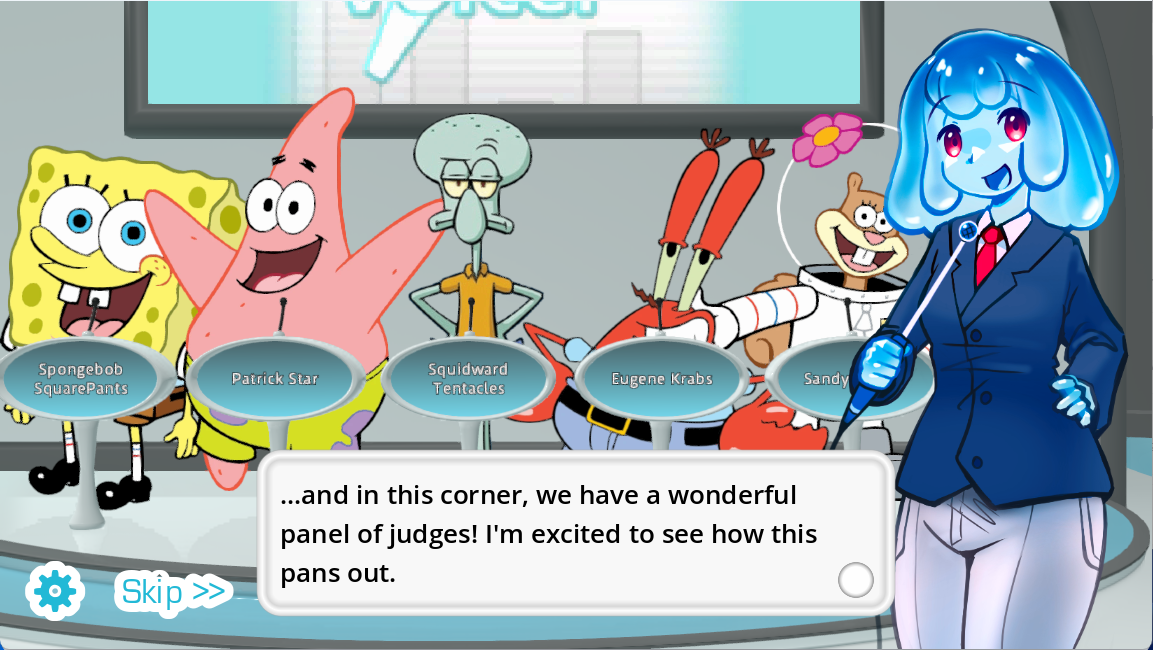
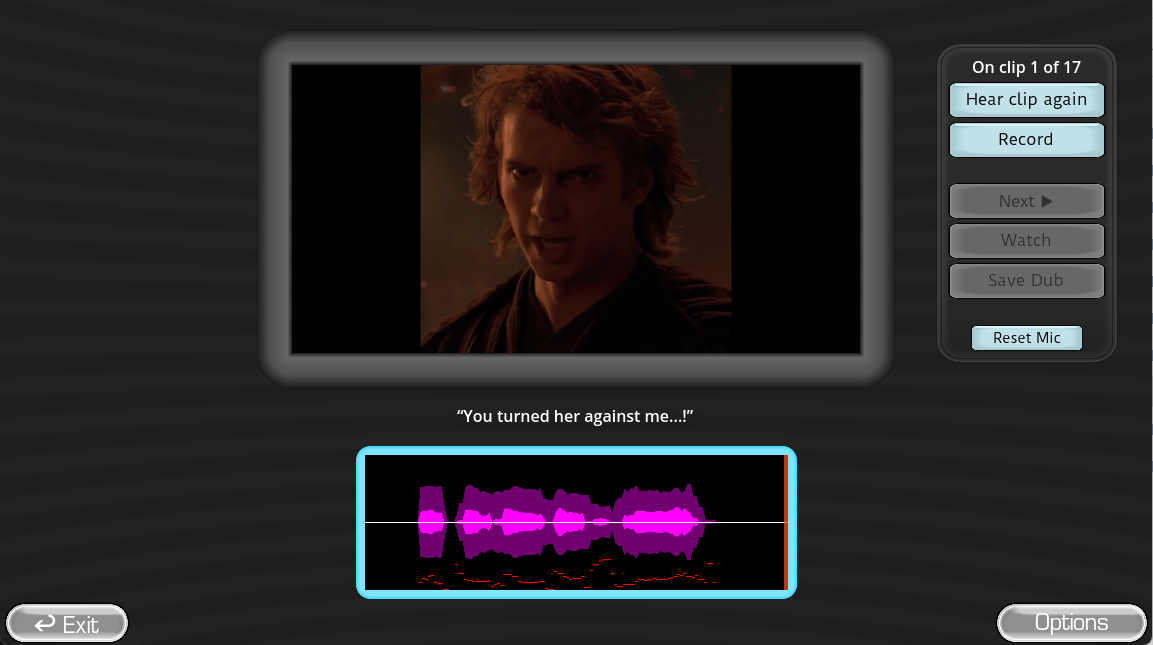
The Choicer Voicer is a voice-impression party game by YeahMaybe. A reference clip plays, you perform the line through a microphone, and a game-show judging panel reacts to the take. The official desktop project is deliberately Pack-driven: voice clips, the host, contestants, judges, menus, and the studio can all be customized, while Dub Mode turns complete scenes into a voice-over game.
The browser game above lets you create one finished video free. Choose a Mod, record the timed lines, and generate the complete scene with your voice. The one-time $5 Game Pass keeps online play available for life, unlocks every Mod and custom Mod uploads, and enables voiced-video downloads. It adapts to phones and tablets and also works in a modern browser on Mac, Windows, Linux, and Chromebook.
- Official creator
- YeahMaybe
- Official store
- itch.io
- Online version
- First video free · lifetime Game Pass $5 once
- Browser devices
- Mobile, Mac, Windows, Linux, Chromebook
- Desktop client
- Windows and Linux, $5 USD or more
- Client multiplayer
- Local, 1–4 players
Choose online play or an installed client
Choicer Voicer Download Options for Windows, Linux, Packs, and Online Play
Choicervoicer.io runs online and needs no installation. Your first finished video is free; the $5 one-time Game Pass unlocks lifetime play, all Mods, custom Mods, and voiced-video downloads. Visitors who prefer an installed Windows or Linux client can use our dedicated Choicer Voicer Download page.
| Official item | What it provides | Cost | Best use | Link |
|---|---|---|---|---|
| Choicer Voicer online | The complete playable web version with Mods, timed scenes, microphone recording, local playback, Pack progression, and results. | First video free; lifetime Game Pass $5 once | Play immediately on mobile, Mac, Windows, Linux, or Chromebook with no installation. | Create the first video free |
| The Choicer Voicer desktop client | Current Windows and Linux game files, free No Gameplay Demo, purchase access, community posts, and development log. | $5 USD or more for the full game | Install the complete desktop game or test microphone compatibility before buying. | Open Download page |
| Packs & References | Game-default folders, a studio reference model, and example voice Packs that show how custom content is organized. | Free download | Understand the folder structure or start building a compatible Pack. | Open Download page |
First-session runbook
How to Play Choicer Voicer from Download to Final Score
A successful first session is less about collecting every mod and more about proving one clean loop: the game loads, the Pack appears, the reference clip plays, your mic records, your take plays back, and the judges can complete the round.
- 01
Test the desktop client microphone before buying
Open the Choicer Voicer Download page and follow its official itch.io link to the free No Gameplay Demo. Select the microphone and playback device you plan to use, record a normal sentence, and confirm that the saved take—not only live monitoring—can be heard.
- 02
Install the current Windows or Linux build
Use the official client link on the Download page, choose the correct platform archive from your itch.io purchase, and extract it to a stable folder where the game can read its Pack directories.
- 03
Add one known-good voice or Dub Pack
Begin with the official defaults or a clearly documented community Pack. Keep the folder intact, read the Pack author’s installation instructions, and add only one new Pack before reopening the game so a loading problem is easy to identify.
- 04
Choose the mode and listen to the complete reference
In the standard game-show loop, listen for wording, pitch movement, pauses, and the energy of the ending. In Dub Mode, also watch the scene timing and who is speaking before you begin the take.
- 05
Perform, review, and retry one variable
Speak close enough to the microphone for a clean waveform without clipping. On the next attempt, change one thing—timing, volume, emphasis, or character—so the judge result and playback give you a useful comparison.
- 06
Build a local party round
For Choicer Voicer multiplayer, add up to four local players on the same device, confirm each input assignment, and use headphones or controlled speakers to prevent reference audio from bleeding into the microphone.
Browser, desktop, and shared-room play
The Choicer Voicer Online: What “Play Online” Actually Means
Searches for the Choicer Voicer online often combine three different wishes: play without installing, use a Pack in a browser, or join remote friends. Those are separate capabilities. The comparison below keeps them clear.
| Option | Runs where? | Pack needed? | Remote online multiplayer? | What it is best for |
|---|---|---|---|---|
| Choicer Voicer online game | choicervoicer.io in a modern browser | Built-in Mods; every Mod and custom Mod upload unlock with the lifetime Game Pass | No synchronized remote lobby | One finished video free, then a one-time $5 payment for lifetime online access. |
| The Choicer Voicer desktop game | Windows or Linux download | Yes, for meaningful content | No; local 1–4 | The complete customizable game-show, Twitch, and Dub Mode experience. |
| thechoicervoicer.app | Web browser | Yes; download and upload a compatible Pack | Not the official game’s online multiplayer | Among the supplied reference pages, this is the in-browser Pack studio; preparation is still required. |
| Discord or video-call session | Desktop game plus screen/audio sharing | Yes | External workaround, not native multiplayer | Let remote friends watch, vote, or take turns through a shared stream while one machine runs the game. |
Create your first video free
No installation or purchase is needed for the first finished video. The one-time $5 Game Pass then unlocks lifetime play, every Mod, custom Mod uploads, and video downloads.
Use the official desktop game
Choose this when you want custom judges, hosts, studios, contestants, Voice Packs, Twitch modes, and complete Dub Mode sessions.
Share one local session
The official game has no native online multiplayer. A voice call and screen share can make the room social, but audio routing and delay remain external setup concerns.
The content makes the show
GameBanana Choicer Voicer Packs, Mods, and Dub Packs
The base game is intentionally close to a blank canvas. Packs supply the material and presentation that make one group’s session completely different from another. People may type voicer choicer mods or voicer choicer dub packs; they are usually looking for the same Choicer Voicer community content.
Voice Packs
Reference clips for players to imitate. Start with short, clear lines you already know, then expand by theme, character, creator, or difficulty.
Dub Packs
Scene video, timed lines, captions, and supporting metadata for the voice-over game flow. Check version compatibility before importing.
Judge Packs
Replacement panel artwork, reactions, and scoring presentation that can turn the same prompts into a different game-show identity.
Host & Contestant Packs
Presenter and player-character assets that change who appears on stage and how the show introduces each round.
Studio & Menu Packs
Visual themes for the set and interface. These reshape the atmosphere without changing the voice-performance rules.
Chatter Packs
Audio cues intended for Twitch-centered play, allowing chat actions to become part of a streamed show.
APP, mobile, MacBook, Android, Steam, and Discord
Where Can You Play The Choicer Voicer?
The online Choicer Voicer game works directly on mobile and Mac as well as Windows, Linux, and Chromebook browsers. The first finished video is free and no native app is required. The separately downloadable client currently has Windows and Linux builds for users who prefer installation and its desktop-specific modes.
| Search or device | Current answer | Practical next step |
|---|---|---|
| Choicer Voicer APP | The online game needs no app installation; the first finished video is free. | Open choicervoicer.io in a current browser and play immediately. |
| Choicer Voicer mobile | Yes—online and responsive on phone and tablet browsers, with the first video free. | Tap Play, choose a Mod, and allow microphone access only when you record. |
| Choicer Voicer Android | Yes in a modern Android browser; no APK is required. | Use choicervoicer.io directly and avoid unofficial APK files. |
| Choicer Voicer Mac / MacBook | Yes in a modern Mac browser with no client installation. | Play online here; use the Download page only if you also want Windows/Linux client information. |
| Is Choicer Voicer on Steam? | No official Steam release is listed. | Purchase, download, and follow updates through YeahMaybe on itch.io. |
| The Choicer Voicer Discord | The official itch.io listing does not currently publish a verified Discord invitation. | Use the official itch.io community and developer links; verify who operates any third-party Discord before joining or downloading files. |
| Choicer Voicer multiplayer | Local play for up to four; no native online multiplayer. | Assign devices on one computer, or use an external call/screen share for remote spectators. |
Recording, playback, silence, and delay
Why Can’t I Hear Myself in Choicer Voicer?
This is a known concern, not a rare user mistake. The official game page warns that some audio setups can show microphone activity but fail to produce usable recorded playback. Surround or multi-channel output is a recurring trigger because of the underlying engine’s recording behavior.
- Use the official mic demo first.Test detection, live monitoring, recording, and “hear recording” playback as four separate checkpoints.
- Set the intended default input.In Windows Sound settings, choose the real microphone rather than a webcam mic, virtual cable, headset hands-free channel, or disconnected interface input.
- Test one- or two-channel stereo output.Disable 5.1, 7.1, or other multi-channel output temporarily. The developer’s official thread identifies extra output channels as a likely cause of the recording failure.
- Try 44.1 kHz for diagnosis.Community tests in the official thread report success with one or two channels at 44,100 Hz. Treat this as a troubleshooting test, not a universal requirement for every device.
- Close software that reroutes or owns the device.Exit conferencing apps, capture tools, headset suites, DAWs, and virtual mixers one at a time. Reopen the game after changing the audio route.
- Separate microphone capture from speaker playback.If the waveform moves but the recorded take is silent, test wired headphones or a standard motherboard output while keeping the mic as the input.
- Check levels before judging.Lower an input that clips and raise a very quiet mic. Make sure music or the reference clip is not simply masking a low recorded voice.
- Retest the newest official or clearly labeled test build.Read the devlog before switching builds, back up custom Packs, and report reproducible hardware details in the official microphone topic.
Protect the install and your custom show
Is Choicer Voicer Safe, and How Do You Update It?
Keep executables official and Packs inspectable
- Get the Windows or Linux application from YeahMaybe on itch.io.
- Do not use cracks, repackaged installers, or unofficial Choicer Voicer APK files.
- Scan community ZIP archives before extraction and inspect what folders and file types they contain.
- Use media you have permission to perform, record, stream, or redistribute.
- Keep a backup of Packs you made or heavily customized.
Return to the purchase instead of buying again
- Open your itch.io library, purchase receipt, or the official game listing.
- Read the latest devlog and confirm whether the file is stable or a test build.
- Copy custom Pack folders to a safe location before replacing application files.
- Install or extract the current platform build, then restore only compatible custom content.
- Repeat the microphone record-and-playback test before a multiplayer or Dub Mode session.
See complete sessions
Choicer Voicer Dub Mode and Voice Acting Gameplay Videos
These creator videos show why the game is funny in practice: the reference, performance, timing mistakes, group reactions, and final dub matter more than a static feature list.
Vinny — The Choicer Voicer: Dub Mode
A long-form look at how Dub Mode turns scene timing and committed voice performances into the entertainment.
SeeReax — Voice Acting Game Is HILARIOUS
A group-focused example of the voice acting game, where reactions between takes are part of the round.
Direct answers before you download
The Choicer Voicer Game FAQ
How do you play The Choicer Voicer?
Choose a voice or Dub Pack, listen to the reference clip, perform the line into your microphone, and let the judges score the take. The desktop game also supports a local game-show format for one to four players, Twitch-focused modes, and Dub Mode.
Where can I buy and download The Choicer Voicer?
Open the dedicated Choicer Voicer Download page at https://choicervoicer.io/download. It provides clear links to YeahMaybe’s official itch.io listing for the current Windows and Linux client files and free microphone demo, plus the official Packs & References download.
Is The Choicer Voicer free?
Your first finished Choicer Voicer video is free. A one-time $5 Game Pass then keeps online play available for life, unlocks every Mod and custom Mod uploads, and lets you download videos generated with your voice. It is not a subscription.
Can I play The Choicer Voicer online?
Yes. Play directly at https://choicervoicer.io/ on a phone, Mac, Windows PC, Linux PC, or Chromebook with no installation. Your first finished video is free; lifetime online access, every Mod, custom Mod uploads, and voiced-video downloads are included in the one-time $5 Game Pass.
Is The Choicer Voicer multiplayer?
Yes, for local play. The official listing describes a simple local multiplayer mode for up to four players on one device. It also includes Twitch-oriented modes, but the developer states that online multiplayer is not currently available.
Can’t I play The Choicer Voicer on mobile?
Yes. choicervoicer.io is responsive and works in a modern phone browser as well as on Mac. Your first finished video is free, and the one-time $5 Game Pass unlocks lifetime online play, all Mods, custom Mod uploads, and voiced-video downloads.
Is The Choicer Voicer on Steam?
No official Steam release is listed. Use YeahMaybe’s itch.io page for the authorized game purchase, download, demo, updates, and developer posts.
Why can’t I hear myself in The Choicer Voicer?
First test the free No Gameplay Demo. Confirm the correct microphone and playback device, allow microphone access in the operating system, close audio-routing software that may hold the device, and try a one- or two-channel stereo output instead of surround sound. The developer’s official microphone thread explains the known multi-channel recording problem and current test builds.
Where can I find Choicer Voicer voice packs, Dub Packs, and mods?
Start with the official Packs & References download from YeahMaybe for defaults and examples. GameBanana’s The Choicer Voicer hub contains community mods and Pack categories. Check the author, update date, installation notes, permissions, and archive contents before adding any community Pack.
Is The Choicer Voicer safe?
The safest game download route is the developer’s itch.io page. Avoid cracked executables, unofficial APK files, and repackaged installers. Community Packs are data and media additions rather than the official game, so scan downloaded archives and use only material you are allowed to play, record, or share.
How do I update The Choicer Voicer?
Return to your itch.io library, receipt, or the official game page and download the current build available to your purchase. Back up custom Pack folders first, read the developer post for version-specific changes, and retest the microphone after replacing or updating the application.
More community perspectives
Choicer Voicer Guides and Play References
For immediate online play and one free finished video, use choicervoicer.io—the version built for browser, mobile, and Mac access. For an installed Windows or Linux client, use our Download page. The following community pages are optional additional perspectives, not substitutes for playing here or using the verified download path.